Dojo Islands
- 3.8
- Rating
- 10.00K
- Installs
- Free
- Price

 Analysis by App-foxy
My first impression of Dojo Islands was that it is trying to make learning feel like a place children can enter, rather than a worksheet they have to finish. It is an educational game from ClassDojo built around a virtual world where kids create, build, and play together. That basic idea gives it a different mood from a typical quiz app: the setting matters, personal expression matters, and the experience is meant to feel social as well as playful.
I approached it as a parent-friendly game rather than as a classroom tool, and that distinction helped me understand its appeal. The game is free to start, is marked suitable for Everyone, and runs on Android devices using version 7.0 or later. Its current version is 1.8.0, so anyone considering it should still check that an older phone or tablet meets the operating requirement before expecting a smooth installation.
The most important question is whether a child wants an open-ended place to make things and spend time with friends. If the answer is yes, this has a clear advantage over a narrow spelling, arithmetic, or memory game. If the child needs direct instruction with measurable lessons, however, I would look at a dedicated learning app first. Dojo Islands is educational in its setting and purpose, but its attraction comes from exploration and creation rather than from a conventional sequence of exercises.
You May Also Like

 AccuWeather: Weather Radar
AccuWeather Review: A Quick, Clear Forecast for Everyday Decisions
For everyday plans, the best forecast is the one you can understand quickly. AccuWeather makes rain timing, radar, and local conditions easy to act on, with a few trade-offs.

 Hill Climb Racing
Why Hill Climb Racing Still Turns Crashes Into One More Run
A tiny car, a bumpy hill and one more upgrade: Hill Climb Racing keeps resurfacing because its simple chaos makes every near-miss feel personal.

 AliExpress - Shopping App
AliExpress Makes Global Shopping Feel Personal, but Shoppers Bear the Risk
AliExpress turns a global marketplace into a pocket-sized discovery engine. Its reach is useful, its shopping loop compelling, and its trade-offs easy to miss.

 Lords Mobile: Kingdom Wars
Lords Mobile Is a Kingdom-Building Routine, Not a Quick Match
A case-by-case verdict on the building, battles, device demands, and social commitments that make Lords Mobile rewarding for some players and exhausting for others.

 PDF Scanner app - TapScanner
TapScanner Makes Paperwork Easier to Capture, Check, and Share
TapScanner makes scanning with a phone feel less like a rescue operation and more like a dependable step in getting work done. Its capture tools are useful, though not flawless.

 Block Blast!
 Shows How Much a Puzzle Game Can Leave Out
A quiet grid game shows why puzzle players increasingly value instant clarity, repeatable skill and low-pressure play—and where the genre still needs to catch up.
More From Our News Desk
View All News


How the island world turns play into a shared language
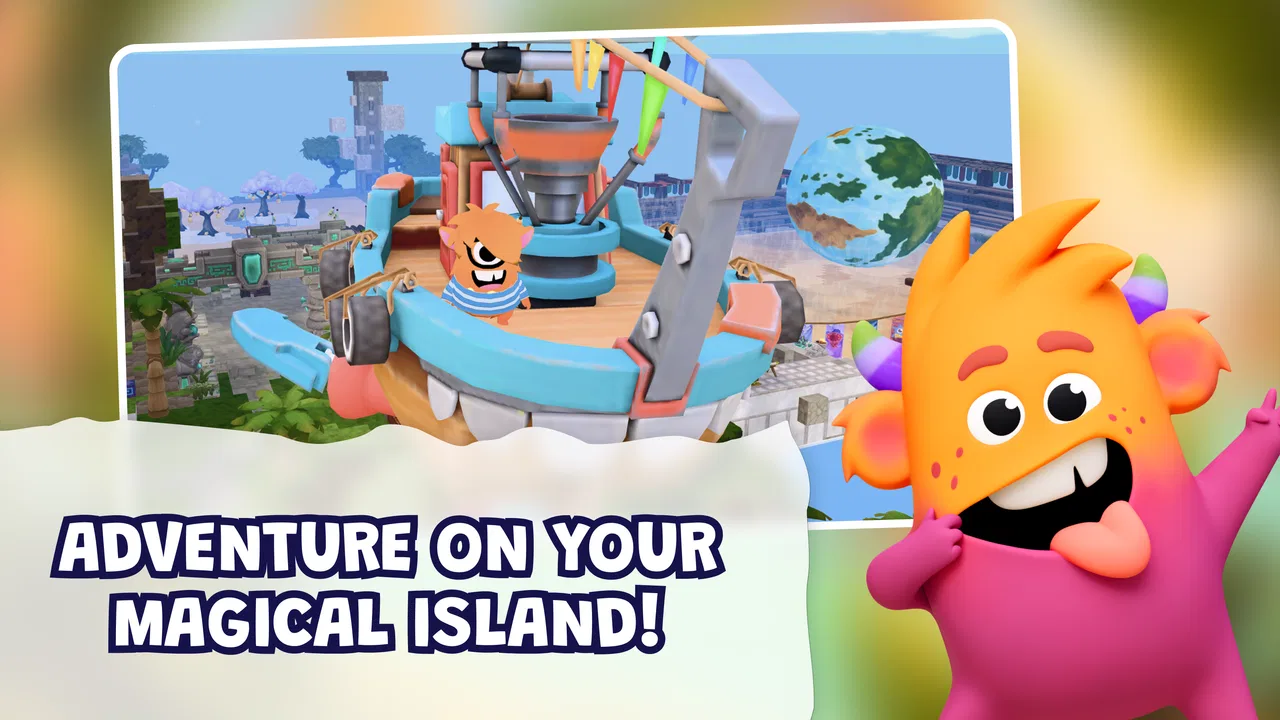
The visual direction is doing a lot of the work here. A virtual island is an immediately understandable setting for children: it suggests discovery, room to build, and a break from the rigid layout of a digital classroom. Instead of presenting learning as a list of tasks, the game frames it as participation in a place. That makes the experience easier to approach for a child who might resist an app that looks too much like homework.
I also like the way the setting supports different kinds of players. A child who enjoys arranging and decorating can find satisfaction in shaping a personal space, while another may be more interested in visiting, playing, or seeing what others have created. That variety is useful because siblings or classmates rarely enjoy exactly the same activity. A shared world gives them a reason to be together without forcing them to follow an identical path every minute.
There is a subtle trade-off in this kind of design. A world that invites free play can be more welcoming than a menu of lessons, but it can also make the educational purpose less obvious. Parents should not assume that the island setting automatically provides the same focused practice as a specialist learning product. I would treat it as a creative and social supplement, especially for short sessions after school, rather than as a replacement for reading, mathematics, language, or science instruction.
The art direction also helps the game feel coherent. The island concept gives the different activities a common identity, so the experience does not feel like unrelated mini-games placed beside one another. Even when the child is moving between making, building, and playing, the setting provides a reason for those actions to belong together. That matters for younger players, who often respond more strongly to a recognizable world than to an abstract list of educational goals.
One practical way I would use it is as a transition activity. After school, a child could spend a limited period creating something on the island before moving to dinner or another responsibility. The world gives the session a natural beginning and end: enter the island, work on a small idea, show it to someone, then leave. That is more manageable than opening an endless entertainment feed, where it is difficult to explain what the child has actually been doing.
The shared element deserves adult attention, even though the age classification is Everyone. I would still establish household rules before handing over a device: who the child may interact with, when the game can be used, and whether purchases are allowed. The game includes optional in-app purchases priced from $3.99 to $59.99 per item, so a parent should protect the payment method and make the purchase boundary clear. That is not a reason to dismiss the game, but it is an important part of responsible setup.
Why the setting works better than a lesson list
For a child who is motivated by imagination, the island can make participation feel self-directed. The child is not simply waiting for the next question; they are deciding what to make, where to spend attention, and how to use the world. That sense of ownership can be a genuine learning advantage because it encourages planning, experimenting, and explaining choices.
For a child who becomes frustrated when there are too many open choices, the same design may feel vague. In that case, I would play alongside them at first and suggest a small project rather than asking them to “go explore.” For example, a parent might propose creating one area with a clear theme, then invite the child to explain why each part belongs there. This turns free play into a simple exercise in organizing ideas without making the game feel like a test.
That is one of the less obvious strengths of Dojo Islands: it can support conversation. Asking a child to describe what they built, how they decided on it, or what they would change next time adds an offline layer that the app itself cannot provide. The game becomes a prompt for storytelling and reflection, not merely a screen-based reward loop.
The limitation is that this benefit depends heavily on the adult’s involvement. A child may enjoy the world independently, but the deeper educational value is easier to notice when someone asks questions and listens. Families looking for a completely self-explanatory teaching tool may find the experience less satisfying than a product that clearly announces the skill being practiced.
Sound, pacing, and the feeling of staying in the world
Sound and rhythm are especially important in a game aimed at children. A good audio layer should help the island feel alive without making every action feel urgent. What I look for here is a pace that leaves room for looking, choosing, and building. The concept works best when the game feels inviting rather than pressuring the child to rush from one reward to the next.
The island setting naturally supports a gentler rhythm than an action-focused game. Creation and building need pauses: a child needs time to decide what belongs in a space, notice the result, and perhaps revise it. That slower cadence is valuable for an educational title because it gives room for thought. It also makes the game easier to fit into a family routine than a highly competitive experience that encourages one more round every time a session is supposed to end.
At the same time, a relaxed pace can become a weakness if a child does not know what to do next. This is where I would pay attention during the first few sessions. If the child keeps wandering without finding a satisfying activity, the game may need a little guidance from a parent or another player. A short, concrete goal helps: make one area, visit a friend’s creation, or spend the session trying one new building idea.
The mood is most successful when the visual style, sound, and interaction all point in the same direction. The game’s promise is not simply “complete educational tasks”; it is “belong to a safe-feeling creative place.” That requires consistency. If the interface were constantly loud, hurried, or overloaded with prompts, it would undermine the calm imagination suggested by an island world. The appeal depends on the game allowing children to feel present in the setting rather than being pushed through it.
I would also consider the device and the room where it is played. On a shared family tablet, the game is easier to turn into a social activity because a parent can sit nearby and discuss what is happening. On a small phone, the same world may feel less comfortable for building or showing details to another person. The minimum operating system is Android 7.0, but compatibility is only part of the experience; screen size, battery condition, and available storage can affect whether the game feels pleasant during longer creative sessions.
Pacing also affects how parents judge educational value. A child may spend a session making choices that look like simple play, while the useful skills are hidden in the process: sequencing actions, comparing alternatives, communicating an idea, and staying with a project long enough to improve it. Those are worthwhile habits, but they are not as easy to count as correct answers. Families who want visible progress reports may prefer a more traditional educational app alongside this one.
A practical rhythm for family use
I would begin with short, intentional visits rather than leaving the game open indefinitely. Start by asking the child to choose one small aim, then allow independent play, and finish with a quick explanation of what they made or enjoyed. This approach protects the game’s freedom while preventing the session from dissolving into aimless tapping. It also gives parents a better sense of whether the child is engaging with creation, social play, or simply looking for the next novelty.
Another useful habit is to alternate between showing and making. One session can focus on building something personal; the next can involve visiting or sharing it with others. That balance reduces the pressure to produce something impressive every time and encourages the child to appreciate other people’s ideas. It also makes the social side more purposeful than simply being present in the same virtual space.
If the child becomes upset when a session ends, the problem may not be unique to this game, but the open-world structure can make stopping less obvious. I would give a warning before the final activity and agree on a stopping point, such as finishing the current small task. Ending at a natural milestone is usually easier than removing the device in the middle of an unfinished creation.
Where the mechanics fit—and where they do not
The mechanics make sense when they reinforce the central loop of creating, building, and playing together. Those actions are broad enough to welcome different interests, and they give the child more agency than a simple question-and-answer format. In my view, the strongest design choice is the connection between making something and having a place where that creation matters. The world gives the activity context.
Compared with a conventional educational game, this approach is less direct. A math trainer usually tells a child exactly what skill is being practiced and can move quickly from one problem to the next. A language game may offer structured repetition and immediate correction. Dojo Islands is better suited to children who learn through experimenting, imagining, and discussing than to children who need a carefully staged curriculum.
Compared with a general sandbox game, its educational identity is more reassuring for families who want play to have a constructive direction. The island setting narrows the experience in a helpful way: it encourages creation and shared activity instead of presenting an enormous universe with no obvious starting point. The trade-off is that children who want deep systems, complex challenges, or highly competitive progression may eventually find it less demanding than a dedicated sandbox or multiplayer game.
The social design is another reason to think about the intended audience. Playing together can encourage cooperation and communication, but it also means the child’s experience may depend on whether friends or family members are available and whether the household is comfortable with shared virtual spaces. I would not choose it solely because it says “together.” I would choose it when the child actually has a trusted social context in which that feature can be used positively.
There is also a difference between “safe” as a design intention and “no supervision needed.” The game is rated Everyone, which makes it approachable for families, but parents should still review the child’s routine, social boundaries, and purchase settings. A safe virtual environment is most useful when it sits inside a safe real-world routine. That simple distinction is easy to overlook when a game is presented as child-friendly.
The free entry point makes experimenting with it straightforward, but the in-app purchase range changes the conversation for families. I would install it only after deciding whether optional spending is acceptable, then make sure the child understands that not every attractive item or possibility needs to be bought. If a family wants a completely purchase-free experience, this may not be the most comfortable choice unless the adult manages the account carefully.
ClassDojo is an interesting developer for this type of product because the game carries a clear connection to children’s learning and community. Still, I would judge the app on the child’s actual response rather than on the developer’s name. Some children will immediately understand the island as a place to express themselves; others will ask what they are supposed to accomplish. That difference is more important than the educational label alone.
Who should try it first
I would recommend giving it a chance to children who like making spaces, telling stories about what they have created, or playing in a shared environment without needing constant competition. It is also a sensible option for families seeking a gentler alternative to fast action games, especially when the goal is to encourage creativity and conversation during screen time.
I would be more cautious for children who need explicit instruction, visible lesson goals, or frequent challenge to stay engaged. A specialist educational app will probably do a better job when the parent’s priority is practicing a particular academic skill. Likewise, a child who wants advanced construction systems or intense multiplayer competition may outgrow the island’s style of play sooner than a younger or more imaginative player.
One concrete workflow I found useful is to connect the game to a real-world project. After a child builds an area, ask them to sketch a similar place on paper, describe its purpose, or invent a short story about someone who lives there. This does not require extra software or complicated teaching plans. It simply turns the game’s visual decisions into language, drawing, and planning practice.
A second workflow is to use the game for collaborative problem solving between siblings. Give them a shared theme and let each child contribute one part, then ask them to explain how the pieces fit. The point is not to make the result perfect; it is to encourage negotiation and listening. This is a more meaningful use of the multiplayer idea than leaving children to play beside one another without speaking.
A third tip is to watch for the child’s preferred role. If they spend most of their time designing, encourage them to explain choices. If they prefer visiting and playing, invite them to notice how another creation differs from their own. If they seem unsure, offer a small goal rather than a long list of instructions. These adjustments make the open structure work for the child instead of expecting every player to enjoy it in the same way.
The public response gives a useful but modest signal: the game has an average rating of 3.8 from around 74 ratings, with 8 written reviews and over 10K installs. I would read that as evidence of early interest rather than a final verdict. The numbers are not large enough to tell me that every child will have the same experience, so I would treat the free entry as an opportunity to test the fit with one child and one device.
My atmosphere verdict after looking beyond the novelty
Dojo Islands works best when I think of it as a creative social space with educational value, not as a complete digital curriculum. Its art direction gives children a friendly place to enter, its island setting provides a clear identity, and its slower rhythm leaves room for imagination. The mechanics are at their strongest when building and playing together lead to conversation, planning, and personal expression.
Its limitations are equally clear. Open-ended play can feel directionless, social activity needs sensible adult boundaries, and optional purchases require household control. The game may also disappoint families expecting formal lessons, measurable academic progression, or the depth of a full sandbox. Those are not small details; they determine whether the app feels purposeful or merely pleasant.
For me, the best reason to try it is the way it gives a child something to talk about after the screen is turned off. A creation can become a story, a shared project can become a lesson in cooperation, and a short island visit can feel more intentional than passive scrolling. That value is easy to miss if the game is judged only by how many tasks it contains.
I would recommend it to families who want a creative educational game with a gentle, shared atmosphere and who are willing to guide the experience occasionally. I would skip it in favor of a focused learning app when a specific school skill is the priority, or choose a deeper sandbox when advanced systems matter more than accessibility. For the right child, though, the combination of art direction, sound, setting, and unhurried play creates a coherent mood that supports learning without pretending to be a textbook.
Because it is free to begin and suitable for Everyone, trying it is relatively easy, provided the device meets Android 7.0 or later and the family is prepared to manage optional spending. My final advice is to start with a short shared session, give the child one small creative goal, and see whether they naturally want to explain or improve what they made. If that conversation happens, the island is doing something valuable. The real strength is not simply that children can play together; it is that the world gives their play a shape worth thinking about.
FAQs for Dojo Islands
01What is Dojo Islands and what kind of game is it?
Dojo Islands is a mobile game built around martial arts-themed challenges, exploration, and progression. Players can expect to move through island environments, complete activities, improve their character, and take part in battles or skill-based encounters, depending on the game mode. Its colorful presentation and accessible controls make it suitable for casual players, while the upgrade and challenge systems provide extra goals for those who want to progress further.
02Can I play Dojo Islands without an internet connection?
Offline availability may depend on the specific version and features being used. Basic gameplay could be accessible without a constant connection, but online functions such as account synchronization, multiplayer activities, events, leaderboards, advertisements, or in-app purchases generally require internet access. Before downloading, players should check the current store description and test the game after installation, since connection requirements can change through updates.
03Is Dojo Islands free to download and does it include in-app purchases?
Dojo Islands may be available as a free download, but free access does not necessarily mean that every feature is completely cost-free. Games in this category commonly include optional purchases for currency, cosmetic items, boosts, energy, characters, or faster progression. Players should review the Google Play or App Store listing for the latest pricing information and use device-level purchase restrictions if children will be playing.
04Is Dojo Islands suitable for children and younger players?
The game’s suitability depends on its official age rating, the intensity of its martial arts action, advertising, chat functions, and purchase options. Although its visual style may appeal to younger players, parents should check the store rating and privacy details before installation. It is also sensible to disable unauthorized purchases, review permissions, and supervise online interactions if the game includes social or competitive features.
05What devices are compatible with Dojo Islands, and how much storage does it require?
Compatibility can vary between Android and iOS versions, so users should confirm the minimum operating-system requirements on the relevant app store before downloading. The initial installation size may not include additional files downloaded after the first launch, such as graphics, updates, or event content. For smoother performance, keep several hundred megabytes of free storage available and install the latest supported system updates.
Pros
- Relaxing island setting with a friendly
- low-pressure atmosphere.
- Simple controls make it accessible for casual players.
- Exploration encourages curiosity without overwhelming objectives.
- Decorative customization lets players create a personal island style.
- Suitable for short play sessions on mobile devices.
Cons
- Progress may feel slow for players seeking constant action.
- Some activities can become repetitive after extended play.
- Limited challenge may not appeal to competitive gamers.
- Certain content may require patience or in-game resources to unlock.
- Performance can vary on older phones or tablets.

Dojo Islands
Gallery